ZTmail Exploration Part 6:
User Control by Design
Why S/MIME Automation Should Not Decide for UsersSeptember 21, 2026
Automation is one of the main reasons modern software is becoming easier to use. Yet there is a fundamental difference between automating work and making decisions on a user’s behalf. In email, that distinction matters because certificates, identities, private keys, trust relationships, message data, and AI services all involve choices that can have security, privacy, and communication consequences. ZTmail’s design principle is therefore straightforward: automate the work, but let the user remain in control.
That principle runs through the ZTmail App, from the way S/MIME certificates are requested and selected to the identity used to send a message, from the way cryptographic keys are backed up and restored to the choice of AI provider and the permissions granted to an AI assistant. The objective is not to make users configure everything manually. It is to automate repetitive technical operations while keeping meaningful choices visible, explicit, and reversible.
1. User-Initiated Automated Certificate Management, User-Selected Cryptography
Even when ZTmail App provides a free S/MIME certificate and automates its application, configuration, the process does not begin simply because a user has logged into an email account. The user must actively open Settings > Certificates and select “Request Certificates”, then start automatically applying for the certificate. That interaction is small, but it establishes an important boundary: automation begins with user intent.
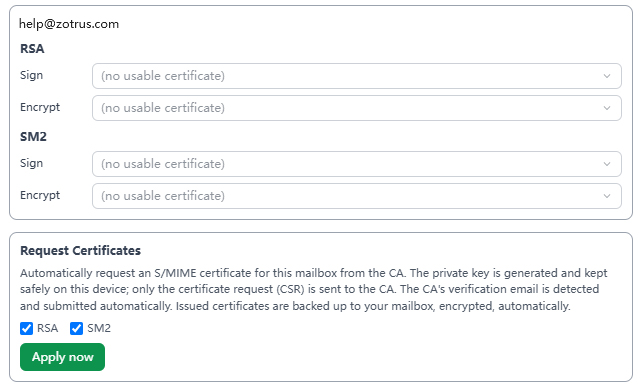
The same principle applies to cryptographic algorithms. Rather than automatically creating a fixed set of certificates using multiple algorithms, ZTmail lets the user decide what is needed. A user can request an RSA certificate, an SM2 certificate, or certificates for both algorithms. The choice depends on the user’s requirements, compatibility needs, and preferred cryptographic environment. Even when the certificate itself is free, ZTmail treats the decision to use it as the user’s decision.
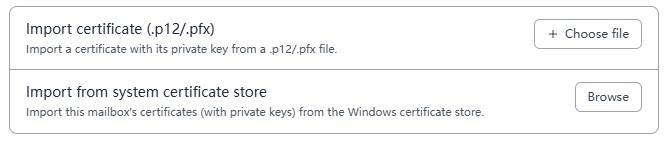
Users can also bring S/MIME certificates they have already obtained from other certificate authorities. Existing certificates can be imported from PFX files or from the Windows certificate store, and users can decide which certificate should be the default for signing and which should be used for encryption. Certificates obtained through ZTmail can likewise be deleted or exported by the user.
This user-control principle also shaped the design of Outlook interoperability. An earlier approach automatically installed ZTmail App auto-configured S/MIME certificates into the Windows certificate store so that Outlook could decrypt ZTmail-encrypted messages without additional setup. The final design instead requires the user to export and install the certificate when that interoperability is needed. The technical result is less automatic, but the security boundary is clearer: ZTmail App does not silently place a certificate on a user’s computer without the user knowing and choosing to do so.
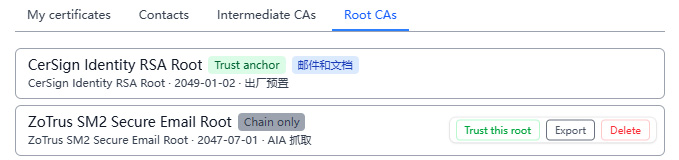
Trust anchors follow the same rule. ZTmail included some trusted CA root certificates as part of its predefined trust configuration, but it does not automatically trust the root certificate associated with an otherwise untrusted CA simply because a signed email contains a certificate issued by that CA. If a user receives a digitally signed message whose certificate chains to a CA that is not already trusted, the user can explicitly select “Trust this root.” The decision about which CA to trust remains with the user.
2. Choosing Which Identity to Present When Sending Email
Email identity is not only a matter of display name. A digitally signed S/MIME message can carry cryptographically verifiable information about the sender, and different certificate validation levels can provide different levels of identity assurance. ZTmail App follows the four S/MIME certificate validation categories defined by the CA/Browser Forum: Mailbox Validated (MV), Individual Validated (IV), Organization Validated (OV), and Sponsor Validated (SV).
The important point is that users can choose which identity level to use for a particular communication. A user may send with an MV identity when mailbox validation is sufficient, use an IV identity when a validated individual identity is appropriate, or use an OV or SV identity when organizational identity or the individual’s relationship with an organization needs to be established. The user can also choose not to sign or encrypt a message and send it as ordinary plaintext email. The communication method and identity presented are ultimately user decisions.
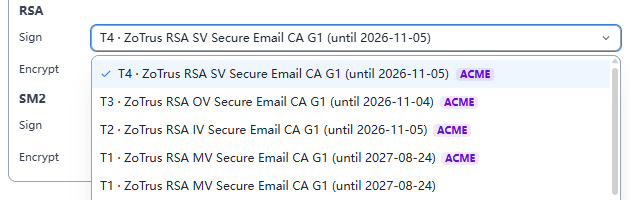
That choice can depend on the recipient and the context. For an initial business communication with someone who has never met the sender, an OV or SV identity may provide identity information that is more relevant to the sender than a mailbox-only identity. When the message is received in ZTmail App, the validated identity can be displayed through the corresponding trust level indicator, such as T3 for organization-validated identity or T4 for sponsor-validated identity, together with the validated organization information. Technology does not force the user to present the strongest available identity in every situation; it gives the user the ability to choose the identity appropriate to the communication.
3. Backup and Recovery Without Taking Ownership of the Key
Certificate and key management is one of the most difficult parts of practical S/MIME deployment. Users need to preserve certificates and private keys across device changes, client migrations, operating-system reinstalls, and recovery events. A common industry approach is to synchronize or back up private-key material into a provider-controlled cloud environment. That approach can simplify recovery, but it also moves cryptographic authority closer to the service provider.
ZTmail App uses a different model. Certificate and private-key material can be automatically packaged into an encrypted backup and stored in the user’s own mailbox. The user remains responsible for protecting the Recovery Key. When the user needs to restore the cryptographic environment on another device, the Recovery Key is supplied by the user rather than being held by ZTmail App.
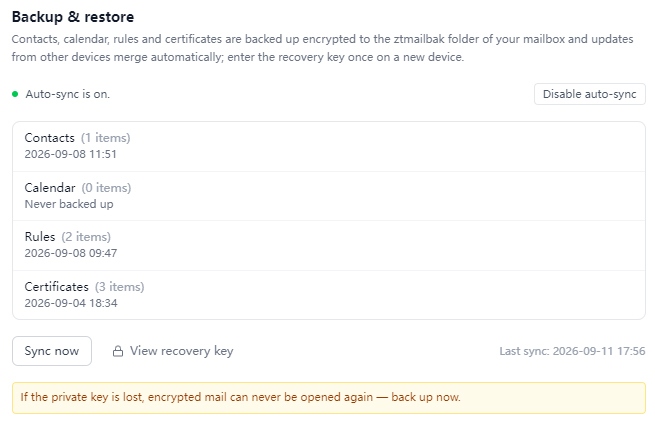
The result is a separation between automation and ownership. ZTmail App automates the repetitive work of creating, updating, storing, and retrieving encrypted backups, while the user retains control over the secret required to unlock them. The user can also initiate synchronization at any time to restore certificates and keys. Where historical encrypted messages depend on previously used keys, the App can recover the relevant certificate and key material so that older encrypted messages remain accessible, subject to the availability of the encrypted backup.
The same principle applies to contacts and calendars. Rather than routinely copying this information into a ZTmail-controlled cloud database, ZTmail App can package contacts, calendars, and related user settings into an encrypted backup stored in the user’s own mailbox. Whether another device is allowed to import that information remains a user decision. ZTmail App provides the synchronization mechanism; it does not become the owner of the user’s personal data. Automation is a service, not a transfer of control: the system makes recovery possible, but users decide for themselves when to recover, what to recover, and on which device to recover.
4. An AI Service Provider You Choose, With an API Key You Control
AI assistants are becoming a standard feature of email clients, but many products bind the assistant to the provider’s own AI service. Users may have little visibility into which model is being used, where requests are processed, or which credentials authorize access to the service.
ZTmail takes a different approach. The user chooses the AI service provider, configures the provider’s API key, and manages the AI assistant locally. ZTmail provides the integration tool rather than bundling a particular AI vendor into the product. The user’s AI API key remains local to the user’s environment.
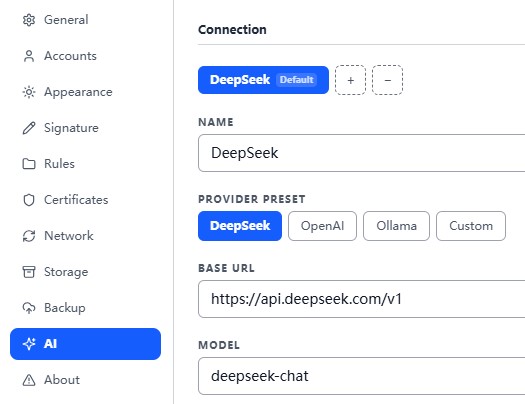
This model also makes the distinction between an AI key and a cryptographic key explicit. The AI API key authorizes access to an AI service. The cryptographic key protects email through encryption and digital signatures. One should not be treated as a substitute for the other. Giving an AI assistant access to an email does not create cryptographic trust in the sender, and having a cryptographic identity does not determine which AI service a user should trust.
5. User-Controlled AI Access to Email
Choosing an AI provider is only one part of user control. The more important question is what the AI assistant is allowed to read. ZTmail therefore provides multiple levels of email access so that users can decide how much information an AI assistant can use.
At the most restrictive level, the user can disable email access entirely. The next level allows access only to the current message, and only when the user explicitly chooses to include the email content in an AI request. There are also settings like whether to send embedded images in emails to AI, or whether to send the contents of attachments (not the original files) to AI. These settings create a per-use authorization boundary: the user decides when a particular message becomes available to the AI assistant.
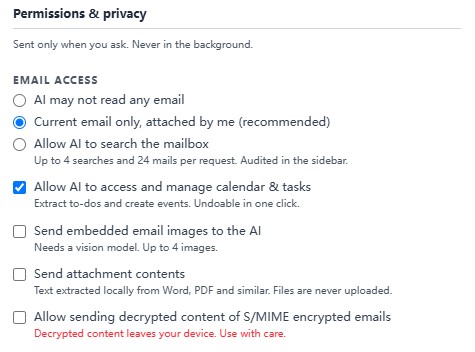
For more complex tasks, the user can allow the AI assistant to search the mailbox. In this mode, the assistant can retrieve historical messages when necessary, while the App records search and reading activity in audit cards in the side panel. The user can therefore review what the assistant has done rather than treating AI access as an invisible background process.
ZTmail also treats access to encrypted email as a separate decision. Users can choose whether encrypted messages may be provided to the AI assistant. This matters because an encrypted message represents information that the user has deliberately protected with cryptographic controls. AI access to that content should therefore be an explicit user decision rather than an automatic consequence of enabling an AI feature.
The AI assistant can also work with calendars and tasks, including extracting action items from email and creating calendar events or reminders. Actions created by the assistant can be undone with a single operation. Automation is therefore paired with reversibility: the assistant can perform useful work, but the user retains the ability to review and reverse that work.
6. My Client, My Rules
The examples above describe the most important user-controlled decisions, but the principle extends beyond certificates, identity, keys, and AI. The ZTmail App is a full email client covering email, calendar, tasks, notes, contacts, and AI assistance, together with S/MIME certificate automation and cryptographic email operations.
Users can choose which certificate authority’s certificate to use, which algorithm to use, which certificate should be the default, which CA roots to trust, which identity level to present, which AI provider to connect, and what level of access the AI assistant receives. Even elements of the App experience, such as appearance and background colors, can be customized. These settings may seem unrelated to cryptography, but together they express the same product philosophy: the client should adapt to the user rather than silently making choices for the user.
This is particularly important in an era when software increasingly combines cloud services, cryptography, and AI. Convenience often comes from removing decisions from the interface. Security and privacy, however, sometimes depend on keeping the right decisions visible. ZTmail’s approach is to automate operations that are repetitive or technically complex while leaving consequential choices with the person who owns the account, the data, the identity, and the cryptographic authority.
ZTmail’s user-control model can be summarized in a simple distinction: automation should remove work, not remove ownership. Users decide when certificate automation begins, which algorithms and certificates they use, which trust anchors they accept, which identity they present, how encrypted keys are backed up and recovered, which AI provider they connect, and what email data the AI assistant may access. ZTmail provides the tools and automation required to make these choices practical, while keeping control of the underlying decisions with the user.
In the AI era, that distinction became increasingly important. The most useful software does not necessarily make every decision itself. It can automate the routine work while keeping the user informed, in control, and able to change or reverse important decisions.
My Client, My Rules.
Click here to read PDF edition (digital signature and timestamp with global trust and global legal effect, all rights reserved, plagiarism is prohibited! Please indicate when reprinting: Reprinted from ZoTrus CEO Blog)